Introducing Smart Filters: Clear up shopper concerns in one tap

Shoppers rarely read reviews top to bottom. They usually land on your product page with one question already in mind: Does it run true to size? Does the battery last? Does it hold up after a few washes? Then they scroll, skim and decide.

The answer is usually in your reviews. But many will give up before they find it, and a shopper who leaves with their question open rarely comes back for the answer.

Smart Filters get them to the answer in one tap.

Meet Smart Filters

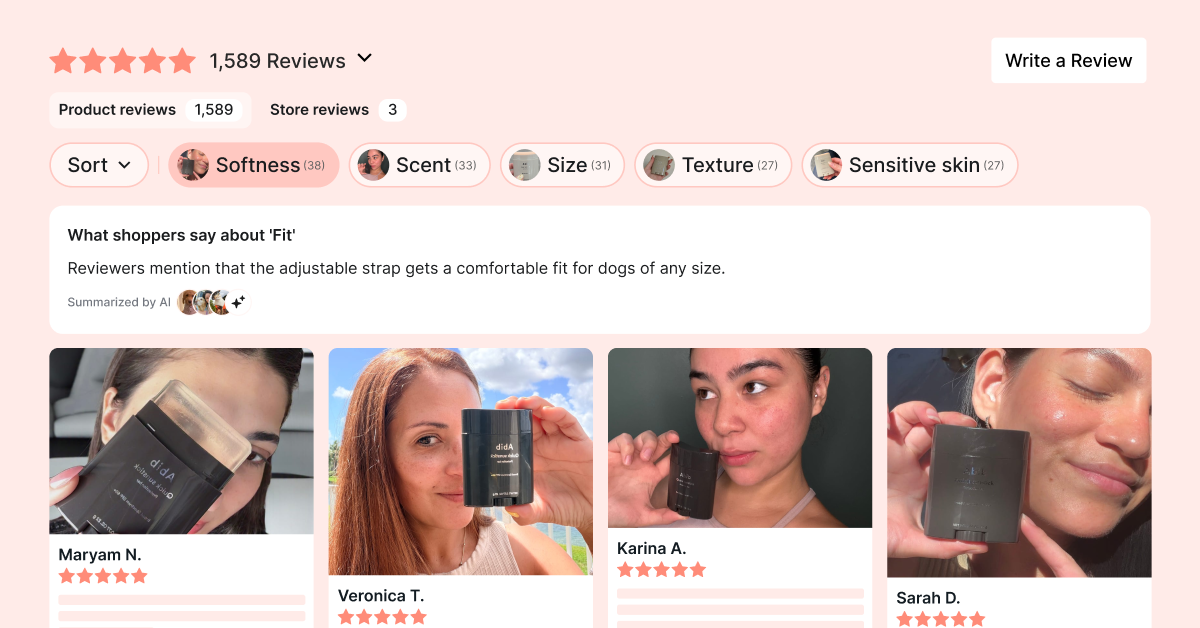
Smart Filters turns what your reviewers talk about most into tappable topics, sitting right above your Reviews Widget. A shopper taps a topic and sees only the relevant reviews, with a short summary of what reviewers say about it.

You turn it on once, and Loox does the rest.

How it works

  1. Finds what shoppers care about. Our AI reads your products’ published reviews and picks out the topics reviewers mention most, like fit, scent or durability.
  2. Shows the right reviews. Shoppers tap a topic and see only the reviews about it.
  3. Gives them the bottom line. With AI Summaries on, the summary above your reviews switches to the topic the shopper picked. The summary answers their specific question before reading a single review.

We find the topics. Shoppers find the answer.

Here’s why you should add Smart Filters to your Reviews Widget:

  • Built from your reviews: Topics are pulled automatically from your existing reviews, with nothing to set up on your side.
  • Delivers the bottom line: Shoppers tap a topic to see only the relevant reviews, with a quick summary of what shoppers are saying about it.
  • Runs on autopilot: New reviews are sorted into topics as they arrive. Turn it on once and it keeps up.
  • Matches your brand: Integrated right into your Reviews Widget, with full control over customization.

Ready to clear up shopper concerns?

<link-to-button> Add Smart Filters <link-to-button>

Smart Filters are available on the Convert plan and up.

Learn how to set it up in our Help Center →